hychin@SenseEdu:~$ sudo apt update && sudo apt install gdebi
忽略:1 https://nvidia.github.io/libnvidia-container/stable/ubuntu18.04/amd64  InRelease
忽略:4 https://download.docker.com/linux/ubuntu focal InRelease
忽略:6 https://nvidia.github.io/nvidia-container-runtime/stable/ubuntu18.04/amd64  InRelease
命中:2 http://mirrors.tuna.tsinghua.edu.cn/ubuntu focal InRelease
命中:3 http://mirrors.tuna.tsinghua.edu.cn/ubuntu focal-updates InRelease
错误:7 https://download.docker.com/linux/ubuntu focal Release
  Could not handshake: Error in the pull function. [IP: 3.170.229.46 443]
命中:5 http://mirrors.tuna.tsinghua.edu.cn/ubuntu focal-backports InRelease
错误:8 https://nvidia.github.io/libnvidia-container/stable/ubuntu18.04/amd64  Release
  Could not handshake: Error in the pull function. [IP: 185.199.108.153 443]
获取:9 https://dl.google.com/linux/chrome/deb stable InRelease [1,825 B]
命中:10 https://packages.microsoft.com/repos/code stable InRelease
错误:11 https://nvidia.github.io/nvidia-container-runtime/stable/ubuntu18.04/amd64  Release
  Could not handshake: Error in the pull function. [IP: 185.199.108.153 443]
命中:12 http://security.ubuntu.com/ubuntu focal-security InRelease
错误:9 https://dl.google.com/linux/chrome/deb stable InRelease
  由于没有公钥,无法验证下列签名: NO_PUBKEY 32EE5355A6BC6E42
正在读取软件包列表... 完成
E: 仓库 “https://download.docker.com/linux/ubuntu focal Release” 不再含有 Release 文件。
N: 无法安全地用该源进行更新,所以默认禁用该源。
N: 参见 apt-secure(8) 手册以了解仓库创建和用户配置方面的细节。
E: 仓库 “https://nvidia.github.io/libnvidia-container/stable/ubuntu18.04/amd64  Release” 不再含有 Release 文件。
N: 无法安全地用该源进行更新,所以默认禁用该源。
N: 参见 apt-secure(8) 手册以了解仓库创建和用户配置方面的细节。
E: 仓库 “https://nvidia.github.io/nvidia-container-runtime/stable/ubuntu18.04/amd64  Release” 不再含有 Release 文件。
N: 无法安全地用该源进行更新,所以默认禁用该源。
N: 参见 apt-secure(8) 手册以了解仓库创建和用户配置方面的细节。
W: 校验数字签名时出错。此仓库未被更新,所以仍然使用此前的索引文件。GPG 错误:https://dl.google.com/linux/chrome/deb stable InRelease: 由于没有公钥,无法验证下列签名: NO_PUBKEY 32EE5355A6BC6E42
取消勾选失效的软件源:
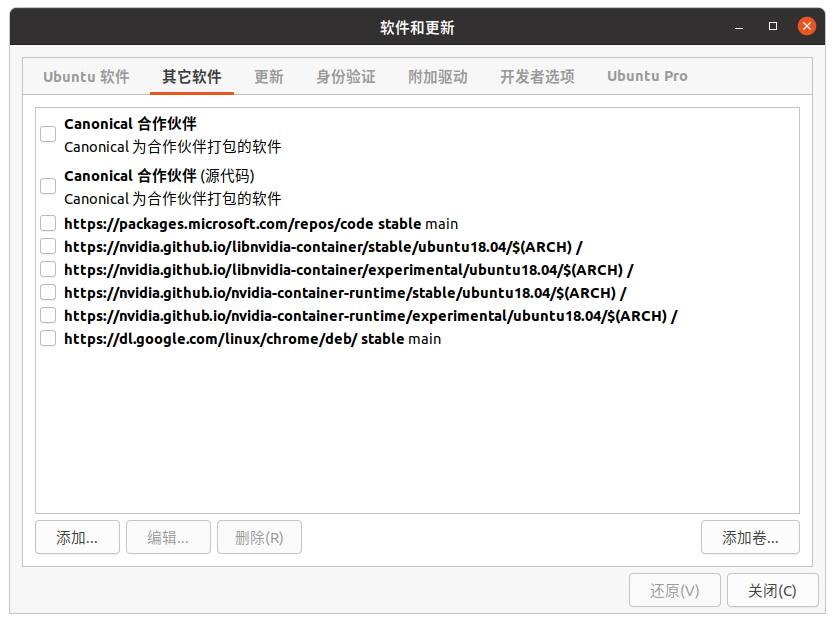
然后更新:
sudo apt update
